
GraphQL

What’s the problem with REST?
- Fixed Entity Structure
- With REST, the client cannot specify the entity parts it want to retrive.
- The entity returned is set by backend developer and cannot be modified on a per-query basis
- Request-Response Only
What is GraphQL?
- GraphQL is a specification, not an implementation.
- Defines the sematics and components of a GraphQL API.
- Does not provide concrete implementations.
- Other parties develop implementations in many languages.
- Defines structure of data returned.
- Perhaps the most important feature in GraphQL.
- Can specify the parts of entity to return.
- Can specify related entities to be returned.
- Can specify filtering in the query.
- JSON-based.
- Extensive usage of JSON.
- Query sent to server in JSON.
- Data is returned in JSON.
- Technically can be used with other protocols, but nobody does this.
- 3 types of operations.
- Retrieve data. (The most common use by far)
- Write / Change data.
- Subscribe to changes in data.
- Schema-based.
- GraphQL works with schema.
- Defines the entities, fields, and attributes. (entity可以看作是一张表,graphql里叫Type。field是表里的一列,graphql中对应type内部定义的字段。attribute是对应列的数据类型或者约束)
- Operations are built on the schema.
- Cross platform.
- Client and server can be based on different platforms.
- Many implementations in many platforms.
Steps to work with GraphQL
- Define the schema. The entities and the fields that together define the components and the models of the system.
- Define the queries for this schema. What exactly we can query from this schema.
- Define mutations and subscriptions (optional).
- Implementing the logic of the queries, the mutations, and the subscriptions.
Schema
Schema is used to define the shape of data. It also defines the queries that we can run against this data and also to define mutation actions and subscriptions.
GraphQL uses schema to first validate the queires so that when a query is run against GraphQL, then graphQL can use the schema to make sure that the fields included in this query are actually fields in the objects and also validate other operations, not just queries.
Schema has a type system and the schema uses this type system to define the field name, field type, and its nullability. The schema uses specialized language, which is called schema definition language (SDL). SDL defines objects, fields, type system, queries and more.
The schema is sometimes auto-generated by the GraphQL implementation based on the concrete language-specific objects.
Object Type and Fields
The basic building blocks of the schema. Describe the entities (=> Objects) and their properties (=> Fields) in the system. Allow GraphQL to be familiar with the system’s object and to provide validation to these entities.
type Book {                     # object type
  bookId: Int!                  # field
  name: String!                 # field
  pages: Int!                   # field
}Each field has a data type, indicating the type of data it can store. GraphQL specifications contain built-in Scalar types. If there’s an exclamation mark at the end, meaning this field cannot be null. If you try to create a new Book object using GraphQL and don’t put values in all the fields, you’ll get an error.
Scalar Types
Built-in scalar types defined in the GraphQL specification:
– Int : A signed 32-bit integer
– Float : A signed double precision floating-point value
– String : A string of characters UTF-8 encoded
– Boolean : true or false
– ID : A unique identifier, but behind the scence it’s a string
Most implementations add custom scalar types such as date.
"""
The `DateTime` scalar represents an ISO-8601 compliant date time type.
"""
scalar DateTimeThe reason we see this comment and definition here is because the DateTime type is not part of the GraphQL specification and was added by this specific implementation.
Steps to add a new object type
- Define the new object in code so that the code
- Include it in the GraphQL model.
Enumerations
Enumaration is basically a special type of scalar type, and it limits the values a field can have to a predefined list. This is great for making sure only valid values are selected. Invalid values will be marked as error in GraphQL.
Lists
- Objects can hold lists of other objects
- Can be declared in the schema
reviews: [BookReview!]! # the first ! means we cannot push null into the list, and second ! means there has to be a list, even an empty one, in other words, reviews cannot be null Interfaces
- Similar to modern development languages, GraphQL allows defining interfaces
- An abstract type with set of fields
- In order to implement interface, a type must include this set of fields
- Allows working with multiple types using a single interface
public interface IReadingMaterials
{
    string Name { get; set; }
    BookGenre Genre { get; set; }
}

public class Book : IReadingMaterials
{
    public int BookId { get; set; }
    public string Name { get; set; }
    public int Pages { get; set; }
    public double Price { get; set; }
    public DateTime? PublishedDate { get; set; }
    public BookGenre Genre { get; set; }
    public Author? Author { get; set; }
    public BookReview[]? Reviews { get; set; }
}

public class Magazine : IReadingMaterials
{
    public string Name { get; set; }
    public BookGenre Genre { get; set; }
    public int IssueNo { get; set; }
}using System.Text.Json;
using System.Text.Json.Serialization;
public class Query
{
public List<Book> Books => ReadBooks();
public List<Magazine> Magazines => ReadMagazines();
public List<IReadingMaterials> ReadingMaterials => GetReadingMaterials();
private List<Book> ReadBooks() {
string fileName = "Database/books.json";
string jsonString = File.ReadAllText(fileName);
return JsonSerializer.Deserialize<List<Book>>(jsonString, new JsonSerializerOptions { PropertyNameCaseInsensitive = true, Converters={new JsonStringEnumConverter()} })!;
}
private List<Magazine> ReadMagazines() {
string fileName = "Database/magazines.json";
string jsonString = File.ReadAllText(fileName);
return JsonSerializer.Deserialize<List<Magazine>>(jsonString, new JsonSerializerOptions { PropertyNameCaseInsensitive = true, Converters={new JsonStringEnumConverter()} })!;
}
private List<IReadingMaterials> GetReadingMaterials()
{
var materials = ReadBooks().Cast<IReadingMaterials>().ToList();
materials.AddRange(ReadMagazines().Cast<IReadingMaterials>());
return materials;
}
}using HotChocolate.AspNetCore;
using HotChocolate.AspNetCore.Playground;
using Microsoft.EntityFrameworkCore;
var builder = WebApplication.CreateBuilder(args);
builder.Services.AddGraphQLServer().
AddQueryType<Query>().AddInterfaceType<IReadingMaterials>(); // When querying for reading materials, we can also return books.
var app = builder.Build();
app.MapGet("/", () => "Hello World!");
app.MapGraphQL();
app.Run();
Unions
- Similiar to interfaces
- Allow querying multiple object types in a single query
- In contrast to interface, object types do not have to have common fields
- Query can specify which field to retrive from each object type
[UnionType("things")]
public interface IThings {}; // marker interface because it's empty

public class Book : IThings
{...}

public class Magazine : IThings
{...}

public class Query
{
    public List<IThings> Things => GetThings();
}When querying:
{
  things {
    __typename
    ... on Book {
      name
      publishedDate
      reviews {
        rating
      }
    }
    ... on Magazine {
      name
      genre
    }
  }
}Operation Type
It’s a good practice to specify the Operation Type when calling GraphQL so that it will be clear what we are trying to do. In GraphQL, if we don’t specify the operation type, then it assumes that what we want to is to query the data because this is the most common usage of GraphQL. There’re 3 types of operations:
– query
– mutation
– subscription
Operation Name
- When calling GraphQL with mulitple operations, it’s a good practice to name the operation.
- This helps when debugging and logging the operation on the server side.
- Simple to implement – just add the name after the query/mutation/subscription keyword.
Arguments
- So far, when querying, we always asked to return all the records. This is nice for learning purposes, but not very practical.
- We usually want to retrieve some of the data, and be able to specify how we want to filter it. For this, we have Query Arguments.
public List<Book> Books(string nameContains="")  {
        string fileName = "Database/books.json";
        string jsonString = File.ReadAllText(fileName);
        var books =  JsonSerializer.Deserialize<List<Book>>(jsonString, new JsonSerializerOptions { PropertyNameCaseInsensitive = true, Converters={new JsonStringEnumConverter()} })!;
        return books.Where(b => b.Name.IndexOf(nameContains) >= 0).ToList();
}query GetMyBooks {
books(nameContains: "M") {
bookId,
name,
genre,
}
}Variables
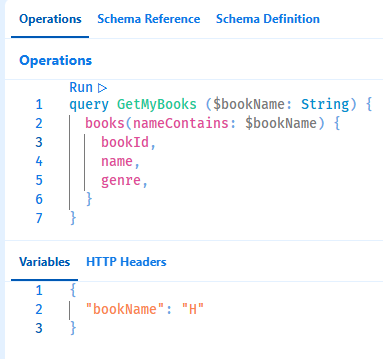
- In the arguments that we defined, we included the value of the argument in the query
- Usually we want to specify the value separately from the query string
- For that we can use
Variables, which do not require any code changes.
Alias
- We can include multiple queries in a single query call
- We can also query the same object type multiple times in the same query call
- This can cause a conflict in the result, as the result is named after the object type queried
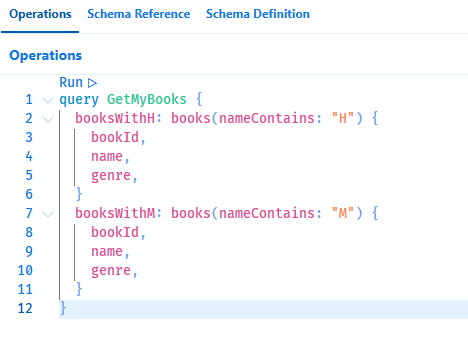
- With aliases, we give a unique name to each query in the request
- The result is named after the alias, and not after the object type
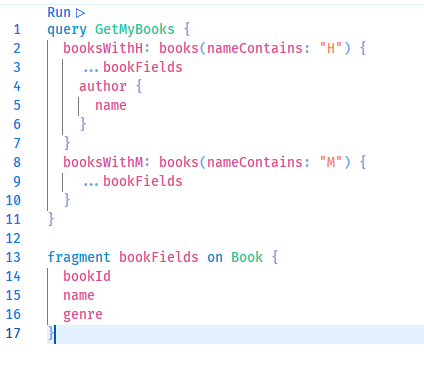
Fragments
Fragments allow us to define the set of fields to retrieve and use it in queries.
Directive
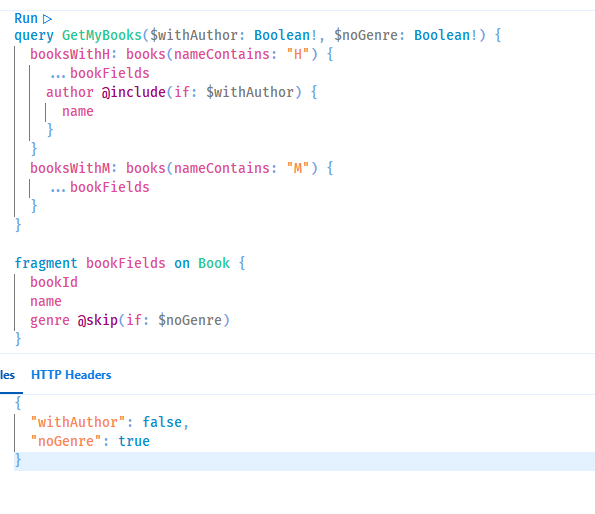
- We often want to queyr to return different set of fields based on specific scenario. For example, for a list of entities we would need less fields than a detailed view of the entity.
- This can be achieved using
Directives. With directives, we can dynamically change the structure and shape of the query based on variables passed to the query. - Each directive checks whether a given argument is true and then executes its instructions.
- Currently 2 directives are part of GraphQL specification:
@include(if: Boolean)– Include the field if argument istrue@skip(if: Boolean)– Skip the field if argument is true
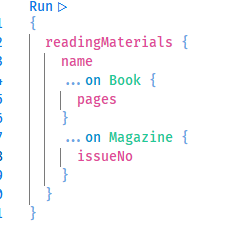
Inline Fragments
- We can use interfaces to retrieve multiple object types in a single query. However, sometimes we might want to retrieve specific type fields even when querying interfaces. For that we can use
Inline Fragments. - With
Inline Fragmentswe define which fields shoudl be retrievedin addtionto the fields included in the interface. - Use the
...type syntax, similar to regular fragments.
GraphQL Server
The GraphQL Server has following roles:
- Define GraphQL Schema
- The GraphQL Server defines the schema using code elements in the server or explicitly using the Schema Definition Language
- Usually based on classes/modules
- Each server has its own schema definition mechanism
- The GraphQL Server defines the schema using code elements in the server or explicitly using the Schema Definition Language
- Expose GraphQL Endpoint
- All GraphQL operations are sent to a specific, single endpoint
- As opposed to REST API which exposes an endpoint for each operation.
- The endpoint is usually named graphql, and is accessed with a POST verb.
- The server expects to receive JSON payload in this endpoint
- All GraphQL operations are sent to a specific, single endpoint
- Validate GraphQL Operations
- The server receives the JSON payload and validates it against the schema
- If a mismatch is found – the server returns a standard error message
- No coding is required for this validation
- Route GraphQL Operations to Code
- The server converts the JSON payload to objects and triggers methods to process the operations and return the data
- These methods are called Resolvers
- The server traverses through the query and runs a resolver for every field
- If the field returns a scalar value – this is what’s returned
- If the field returns an object value – the server runs resolvers for each field in the object
- … and so on until a scalar is returned
Resolversin the same hierarchy run in parallel. You can’t assume one will run before the other. Never use data from another resolver in your resolver.- Most implementations automatically create resolvers for fields. However, custom resolvers can be specified.
- Resolvers can accept arguments with context data about the query.
- Return GraphQL Results
- After running the resolvers and merging the results, the server converts the object to JSON and returns it to the client.