
C# 多线程

Foreground thread vs Background thread
Background threads do not keep the application running, even if they are still executing. However, as long as a foreground thread runs, the application will not close.
C#
Console.WriteLine(thread1.IsBackground);
thread1.IsBackground = true;Staring a new thread
C#
Thread thread = new Thread(() => PrintPluses(30));
thread1.Start();ThreadPool
Creating and starting new threads is a pretty costly operation from the performance point of view. So instead of creating new threads all the time, it would be better to have a pool of threads. When a new work item needs to be scheduled on a thread, we will look into this pool and look for a thread that is not currently used. Then we will schedule this work item to run on this thread. Once the work is finished, the thread will be returned to the pool, ready to be reused. This way, the cost of creating those threads will only be paid once, and after that each thread will be reused many times.
C#
ThreadPool.QueueUserWorkItem(PrintA);TPL (Task Parallel Library)
Nowadays, we use higher-level mechanisms to implement multighreading and asynchrony in our apps. The main tool we will focus on is TPL. The core component of the TPL is the Task class.
Task
A task represents a unit of work that can be executed asynchronously on a seperate thread(记住,这会是backgroundi线程). It resembles a thread work item but at a higher level of abstraction. It allows for more efficient and more scalable use of system resources. The TPL queues tasks to the ThreadPool. It is a relatively lightweight object, and we can create many of them to enable fine-grained parallelism.
Another benefit of using tasks over plain threads is that tasks and the framework built around them, provide a rich set of methods that support waiting for a task to be finished, canceling a task that is running, executing some code after the task is completed, handling exceptions thrown in the code executed within a task, and more. All these things are pretty hard to achieve using only plain old Thread class.
C#
Task task = new Task(() => PrintPluses(200));
task.Start();
// OR
Task.Run(() => PrintPluses(200));
// Underlying they all leverage ThreadPoolAfter the task is started, the main thread continues its work, so the code executed within the task may run in parallel with the code from the main thread and with other tasks.
C#
Task<int> taskWithIntResult = Task.Run(() => CalculateLength("Hi"));
// taskWithIntResult will represent a task that can produce an int,
// but it is not an int yet. Only once this task execution is completed
// can the int result be extracted from this task object
Console.WriteLine("Length is: " + taskWithIntResult.Result);
// We can use the Result property to retrive it. But the problem is,
// accessing the Result property is a blocking operation, which means,
// when we use it, the main thread is stopped until task is finished.
var task = Task.Run(() => {
    Thread.sleep(1000);
    Console.WriteLine("Task is finished");
});
task.Wait();
// When using tasks returning a value, we could use the Result property
// But for non-generic task, it will not carry any result, so instead,
// use the Wait method, which means, wait here until this task is
// completed and only move on to the next line after that
// we can use Wait method for any task, not only non-generic, if we use
// it on a task producing a result, it will stop the current thread
// until the result is ready.

var task1 = Task.Run(() => {...});
var task2 = Task.Run(() => {...});
Task.WaitAll(task1, task2);
// Wait for multiple tasks to be finished.Task Continuation
C#
// A continuation is a function that will be executed after a task is
// completed. We can define a continuation using ContinueWith method
Task taskContinuation =
    Task.Run(() => CalculateLength("Hello there"))
    .ContinueWith(taskWithResult =>
    Console.WriteLine("Length is " + taskWithResult.Result))
    .ContinueWith(completedTask => Console.WriteLine("Final"));
// Schedule a continuation for multiple tasks
var tasks = new[]
{
    Task.Run(() => {CalculateLength("Hello")}),
    Task.Run(() => {CalculateLength("Hi")}),
    Task.Run(() => {CalculateLength("Hola")}),
}
var continuationTask = Task.Factory.ContinueWhenAll(
    tasks,
    completedTasks => Console.WriteLine(string.Join(", ", completedTasks.Select(task => task.Result))));
// tasks must be an array, sorry about that
// second parameter is a lambda which takes the same collection of tasks
// but when this lambda is triggered, those tasks will already be
// completedTask Cancellation
TPL utilizes the concept of cooperative cancellation. It means that the code that requests the cancellation and the code executed within the canceled task must both cooperate to cancel this task.
A cancellation token is an object shared by the code that requests the cancellation and the canceled task. The class that can provide us with such a token is called CancellationTokenSource.
C#
var cancellationTokenSource = new CancellationTokenSource();

var task = Task.Run(() => NeverendingMethod(cancellationTokenSource), cancellationTokenSource.Token);

string userInput;
do
{
    Console.WriteLine("Type 'stop' to end the neverending method:");
    userInput = Console.ReadLine();
} while (userInput?.ToLower() != "stop");

cancellationTokenSource.Cancel();

Console.WriteLine("Program is finishing...");
Console.ReadKey();

static void NeverendingMethod(CancellationTokenSource cancellationTokenSource)
{
    while (true)
    {
        if (cancellationTokenSource.IsCancellationRequested)
        {
            throw new OperationCanceledException(cancellationTokenSource.Token);
            // otherwise the task will be ending in RanToCompletion instead of cancelled
        }
        // 除了上面这种if语句的写法,我们还可以写cancellationTokenSource.Token.ThrowIfCancellationRequested(),效果是一样的。If the cancellation is requested, the OperationCancelledException will be thrown
        Console.WriteLine("This method will never end!");
        Thread.Sleep(1000); // Sleep for 1 second to avoid flooding the console
    }
}So why we need to pass cancellationTokenSource.Token to Task.Run method, and seems it has no usage at all? Well, it may sometimes happen that the task cancellation is requested before the scheduler even starts the task execution. If we don’t pass the cancellation token here, the task will start executing anyway, even if it was requested to be cancelled. It is simply a waste of resources if it was requested to be cancelled. It’s better not to bother with starting it. So generally it is recommended to always pass this token to the method responsible for triggering the task.
Task Lifecycle
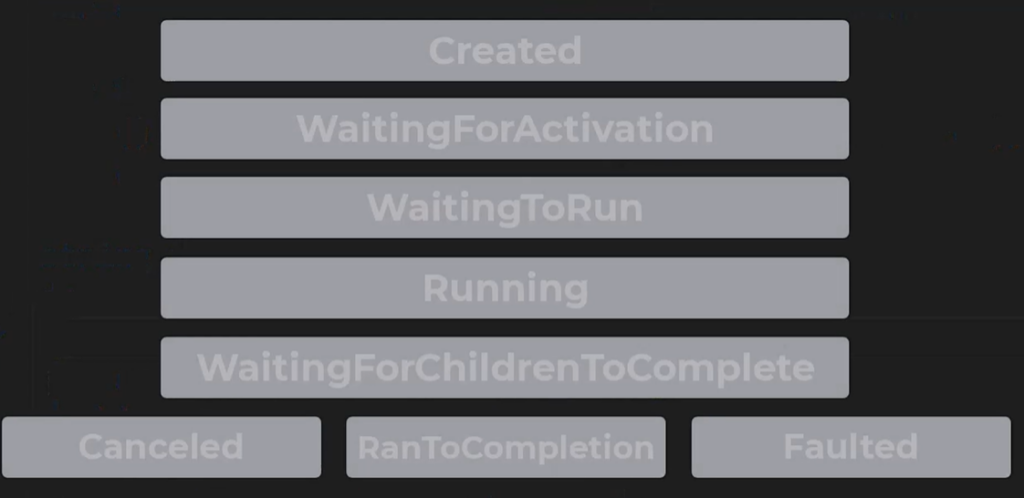
- Created: It will not be updated until the task is scheduled.
- WaitingForActivation: Starting status for tasks created through methods like
ContinueWith. It means the task waits to be scheduled after some other operation is completed. - WaitingToRun: Once a task is scheduled, whether because it’s a continuation of an operation that is already finished, or simply because the Start method has been called on it, its status changes to
WatingToRun. The task is ready to be started, and it’s waiting for the scheduler to pick it up and run it. - Running: 没啥好解释的。
- WaittingForChildrenToComplete: A child’s task or nested task is a task that is created in the code executed by another task, which is known as the parent task. If a task has child tasks, it may need to wait till all of them are completed and this is when its status is WaitingForChildrenToComplete.
- RanToCompletion: If everything goes well, the task life cycle ends here.
- Canceled: If the task has been cancelled before it can be completed, task life cycle ends here.
- Faulted: If there was some error during the task execution, task life cycle ends here.
C#
Task<int> taskFromResult = Task.FromResult(10);
// Sometimes we create a task from a result like this.
// Such a task has no code to execute, and from the very moment we create
// it, its status is already set to RantoCompletion and it carries the
// result we gave it.It's useful for unit testing.Exception Thrown by Other Threads
Exceptions thrown on one thread can by default, only be caught on the same thread. Exceptions thrown on other threads will simply remain unhandled, and they will crash our application. Using tasks, not plain threads, we have much more control over exceptions.
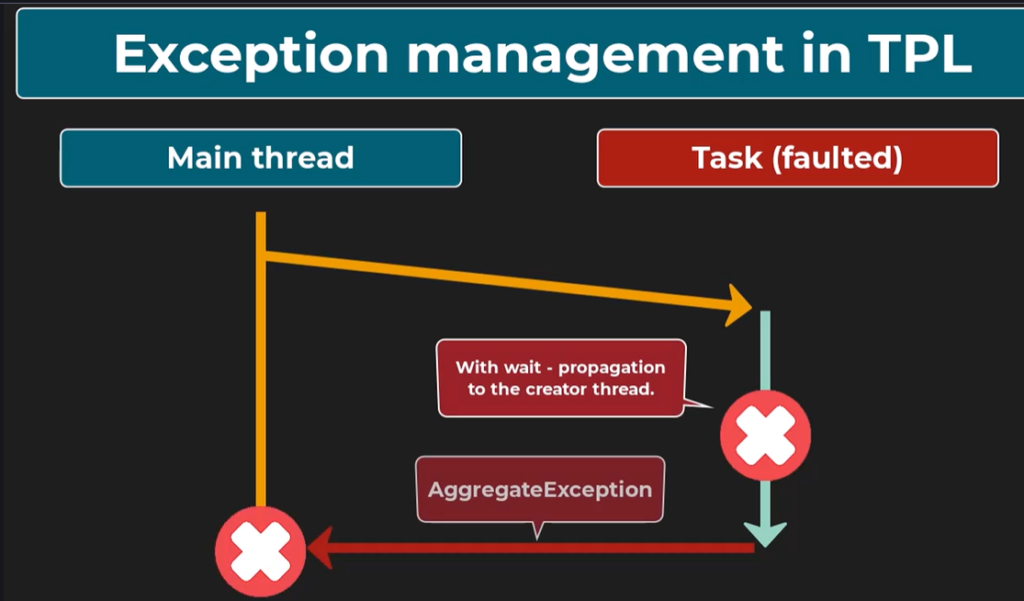
Suppose an exception is thrown within the code executed by a task. In that case, it will only be propagated to the thread that created this task if we await the task completion, for example, by calling the Wait method or by using the Result property. If we wait for the task completion, the exception thrown within this task code will be wrapped in an AggregateException. This is because more than one exception can be thrown within a task. Also, we can await multiple tasks with one command, and all those exceptions will be aggregated within this AggregateException.
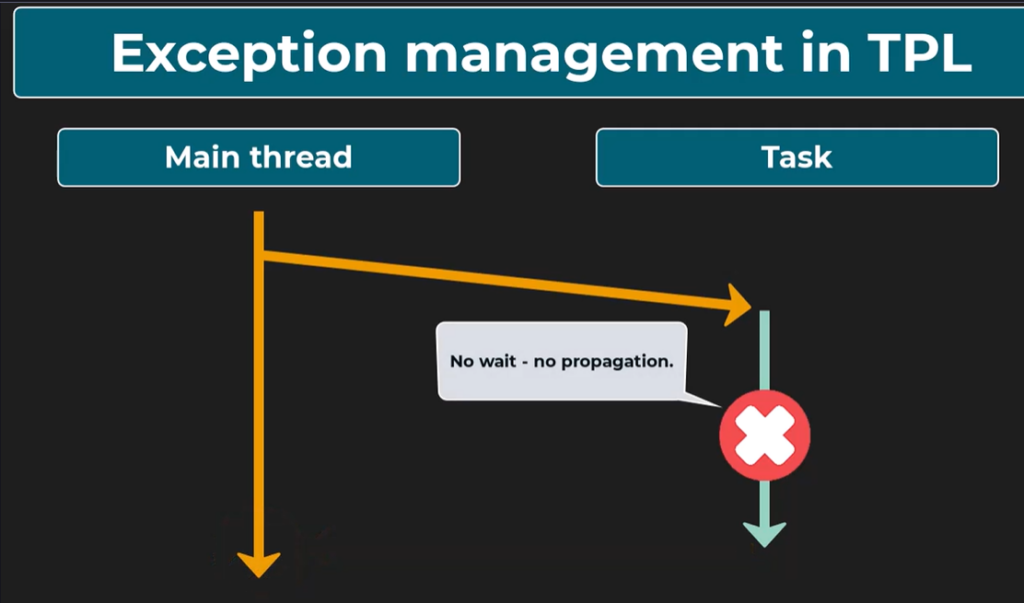
If we don’t wait for the task completion, the exception will not reach the thread that started the task. We will only be able to see that it happend by checking if the task statks is Faulted, and that the Exception property carries exceptions.
Then how to handle the exception asynchronously?
C#
var task = Task.Run(() => MethodThrowingException())
    .ContinueWith(
    faultedTask => Console.WriteLine("Exception Caught: " + faultedTask.Exception.Message),
    TaskContinuationOptions.OnlyOnFaulted);
// This crucial argument decides that this continuation will only be
// triggered if a task ends up in a faulted state.How to handle exceptions carried within AggregateException?
C#
var task = Task.Run(() => Divide(2, null))
    .ContinueWith(
    faultedTask => {
        faultedTask.Exception.Handle(ex =>
        {
            Console.WriteLine("Division task finished");
            // handle the exception and return true, if it can't handle, return false
            // the current lambda will be applied to all excetions carried by AggregateException
            // if all of them are successfully handled, no new exception will be thrown and program will continue undisturbed
            // The continuation task will finish successfully and its status will be RanToCompletion
            // However, all those exceptions for whom false will be returned will be wrapped in another AggregateException
            // and thrown from the Handle method. In other words, if for any exception this lambda will return false
            // the Handle method will thrown a new AggreateException, the status of the continuation task will be Faulted
            // 比如一共3个exception, 这个方法只handle了两个,那么它会再次抛出AggregatedException,里面就只剩那一个没被handle住的异常了
            if (ex is ArgumentNullException)
            {
                Console.WriteLine("Arguments can't be null");
                return true;
            }
            if (ex is DivideByZeroException)
            {
                Console.WriteLine("Can't divide by zero.");
                return true;
            }
            Console.WriteLine("Unexpected exception type");
            return false;
        });
    },
    TaskContinuationOptions.OnlyOnFaulted),

Thread.Sleep(1000);
Console.WriteLine("Program is finished");
Console.ReadKey();

static float Divide(int? a, int? b)
{
    if (a is null || b is null)
    {
        throw new ArgumentNullException("Both parameters must have a value.");
    }
    if (b == 0)
    {
        throw new DivideByZeroException("The second parameter cannot be zero.");
    }
    return a.Value / (float)b.Value;
}Thread Safety
Thread safety is the property of a program that ensures multiple threads can correctly and safely execute it without causing unexpected behavior.
Atomic Operation
An atomic operation is an operation that is indivisible. In other words, it is always performed in one go without a chance of being interrupted. It is composed of a single, very basic step. For example, assigning one to the x variable.
On the other hand, let’s consider the operation of incrementing x by 1. It is not atomic because under the hood 2 steps need to happen: 1. the value of x+1 is calculated and assigned to a temp variable; 2. this temp variable is assigned to x.
Race Condition
A situation in concurrent programming where the outcome of a program depends on the timing of events. It occurs when multiple threads access shared data or resources, and the final outcome is dependent on the order of execution.
Lock
The critical section is the segment of code where multiple threads or processes access shared resources, such as common variabvles and files, and perform write operations on them. We can limit the access to the critical section to 1 thread at a time by using a lock.
C#
class Counter
{
    private object _lock = new object();
    public int Value { get; private set; }

    public void Increment()
    {
        lock (_lock)
        {
            Value++;
        }
    }

    public void Decrement()
    {
        lock (_lock)
        {
            Value--;
        }
    }
}Because locks prevent multiple threads from performing some work simultaneously, they limit the performance benefit we take from multithreading. That’s why it is important to only use lock statements where it is really needed.
Async/Await
Await
await做了什么?
C#
var result = await SomeIOAsync();
Console.WriteLine(result);执行顺序是当前线程先调用SomeIOAsync(),方法开始执行,直到该方法内部碰到第一个await(记住是方法内部的)才返回一个Task。然后第一行代码里的这个await拿到这个Task, 检查它完成了没有。如果没完成,就把await后面的代码注册成一个continuation,把控制权还给caller,当前线程释放去做别的事儿。如果完成了,直接取出结果,继续往下走。所以await永远是现有Task,再去判断状态,它判断的对象就是SomeIOAsync()返回的那个Task。I/O期间没有任何线程在等,这是await最大的价值。
但CPU密集型不一样
C#
// ❌ 这样不对,HeavyCalc 还是阻塞主线程
var result = await HeavyCalc();

// ✅ 正确,把CPU工作推到线程池
var result = await Task.Run(() => HeavyCalc());await 是为I/O设计的。CPU密集型必须配合Task.Run(), 否则await之前那段计算还是占着主线程。
await unwraps the Task result from the Task object. So after the calculation of this task is completed, it will unwrap its result and assign it to result variable.
So remember, if we use the await keyword, we will go back to the caller method while waiting for the completion of the awaited task (这句话不是很严格,如果task本身就是完成的状态,就直接继续往下进行了,这里应该指的是task还处于未完成状态). Of course, the caller method can also await something, and in this case, we’ll go back even further. This way the program can continue even when waiting for some tasks to be finished.
Async
async的作用只有一个:告诉编译器,这个方法里面有await,请帮我把它编译成状态机。它本身不产生任何异步行为,不开新线程,不做任何运行时的事情。纯粹是给编译器看的标记。
为什么需要它?await 方法会把方法切成好几段,I/O完成后还要跳回来继续执行。这个“切段,注册continuation,调回来”的逻辑compiler帮你生成,但compiler需要知道哪些方法需要这样处理,所以要加”async”告诉它。
返回值规则:
C#
async Task Main()           // 没有返回值
async Task<string> GetData() // 返回 string
async ValueTask<int> Calc() // 轻量版,适合经常同步完成的场景注意你写 return "hello",但方法签名是 Task<string>,编译器自动帮你包装,不需要你手动 return Task.FromResult("hello"). The async keyword makes the method asynchrounous, and asynchrounous methods always return a Task of some kind. Usually async methods that do not produce any result should return a non-generic task. For methods that do not produce any result, a non-generic task will be created and returned behind the scenes. For methods that do return some results, we should simply return it, and it will be wrapped in a generic task.
方法标记了async,一般都会返回Task,少部分情况返回void-只用于事件处理器。async void 有个大问题:异常无法被捕获,调用方拿不到 Task,没办法 await 它,所以除了事件处理器之外不要用。还有一种是ValueTask,这个属于性能优化下的场景,还没学到那儿,到时候再说。
Exceptions in Async Methods
C#
Process("hello");

static async Task Process(string input)
{
    throw new Exception("Exception thrown");
}
// 因为方法标记了 async,编译器把它变成了一个状态机,状态机内部有 try/catch
// 包裹着你所有的代码,任何异常都会被捕获然后存进 Task,而不是直接往外飞。
// 所以主线程调用 Process() 时异常在状态机内部就被拦截了主线程拿到的是
// 一个已Faulted的Task,并不知道里面有异常,自然不会 crash。
// 这就是为什么 async 方法和普通方法的异常传播方式完全不一样。C#
await Process("hello");

static async Task Process(string input)
{
    throw new Exception("Exception thrown");
}
//await会去检查Task的状态,发现里面有异常,这时候才会把异常重新抛出,你就能 catch 到了Exception handling for code using async and await is pretty similar to what it was for any other task. If the task is not awaited, the exception will not propagated. Thus, we will not be able to catch it in the code that started this task. Nevertheless, the task will become faulted and carry this exception as a property. If we await a task, then the exception will be propagated and we can handle it in a pretty standard way using the try-catch.